See what you sold, and what your accountant needs
Reports show your sales after refunds, day by day, against the days before and the same weeks last year, and how customers paid.
What you see
The same sales, cut three ways
Open Reports. Each view answers one question.
Overview: how is the shop doing?
Sales after refunds, against the days before and the same weeks last year, then each day and how customers paid.
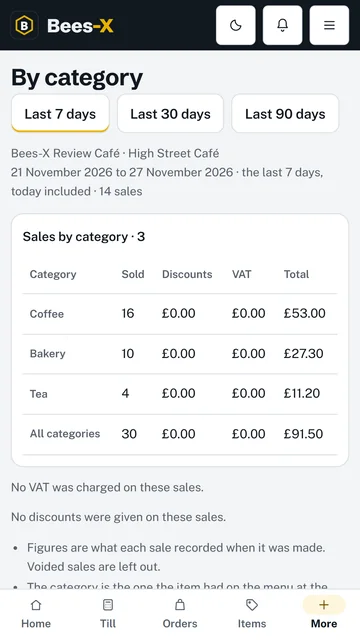
By category: what sells?
Sales by menu category, the VAT at each rate, and the discounts given and why.
By person: who sold it?
Each person’s sales, average sale and hours worked, with their tips.
Money going out
Costs next to your sales
Expenses
In Reports, open Expenses. Add the date, what it was for and the amount, such as rent or rates. Each month shows its total.
Bills and money you are waiting for
Choose Upcoming and add a bill to pay or money to receive, with its date and a reminder. When it happens, mark it paid or received.
Discounts with their reason
A price changed at the till is kept as a discount with its reason, so By category can show what was given and why.
VAT only if you are registered
Answer the VAT question in Settings and the till follows it. If you are registered, Reports show the VAT at each rate.
Bees-X shows the figures. It does not file a VAT return or do your accounts: that stays with you and your accountant.
Read next
More on the numbers
Questions we get asked
How do I see my sales?
Open Reports. The Overview shows sales after refunds, against the days before and the same weeks last year, then each day and how customers paid.
Where do I see VAT and discounts for my accountant?
Open Reports, then By category. It shows sales by menu category, the VAT at each rate, and the discounts given and why.
How do I see what each person sold?
Open Reports, then By person. It shows each person’s sales, average sale and hours worked.
Where do I keep track of rent and other costs?
Open Expenses. Add the date, what it was for and the amount. Each month shows its total.
Does Bees-X file my VAT return?
No. Reports show the VAT at each rate for you and your accountant. Nothing is filed for you.
Something else? Every question is answered in Help.
30 days freeNo credit card
Start free