Allergens on your menu, where customers can see them
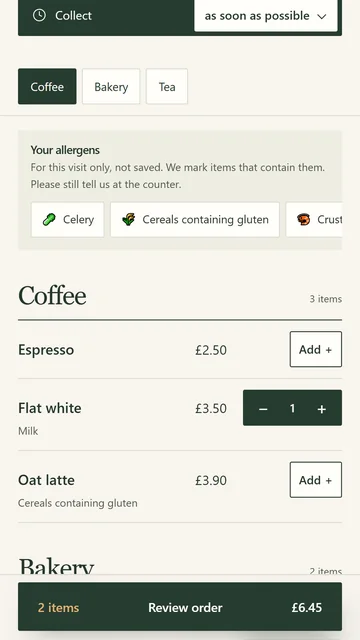
Record the allergens you declare on a menu item. On your order page, customers see them before they order.
How it works
You declare, the menu shows it
The allergens are yours to state. Bees-X keeps them with the item and shows them.
On the menu item
You record allergens on a menu item, next to its choices and prices.
Seen before the order
On your order page, customers see the allergens of an item before they order it.
One place to keep them right
When a recipe changes, update the allergens on that item. Your order page then shows the new ones.
Bees-X shows what you declare. It does not check a recipe or a supplier for you, and it cannot tell a customer that a dish is safe for them. Cross-contact in your kitchen is yours to explain.
Good practice
Keeping allergen information honest
Declare from the label, not from memory
Read the supplier’s label for every ingredient, and again when a supplier or a product changes.
Say when you are not sure
When allergen information is unconfirmed, the menu asks customers to speak to your team.
Tell the people at the counter
Whoever serves should know where the allergen information is and who to ask.
Check the rules for your country
Food allergen rules differ between the UK and Ireland. The Food Standards Agency and the Food Safety Authority of Ireland publish the current ones.
Read next
More on your menu and orders
Questions we get asked
Where do customers see allergens?
On your order page, on the menu item, before they order.
Does Bees-X work out the allergens for me?
No. You declare the allergens of each item, and Bees-X shows what you declared.
Does it make my menu compliant?
It gives you a place to record allergens on each item and show them to customers. Meeting the food rules in your country stays with you.
What if a recipe changes?
Change the allergens on that item. The menu and your order page show the new ones.
Something else? Every question is answered in Help.
30 days freeNo credit card
Start free